

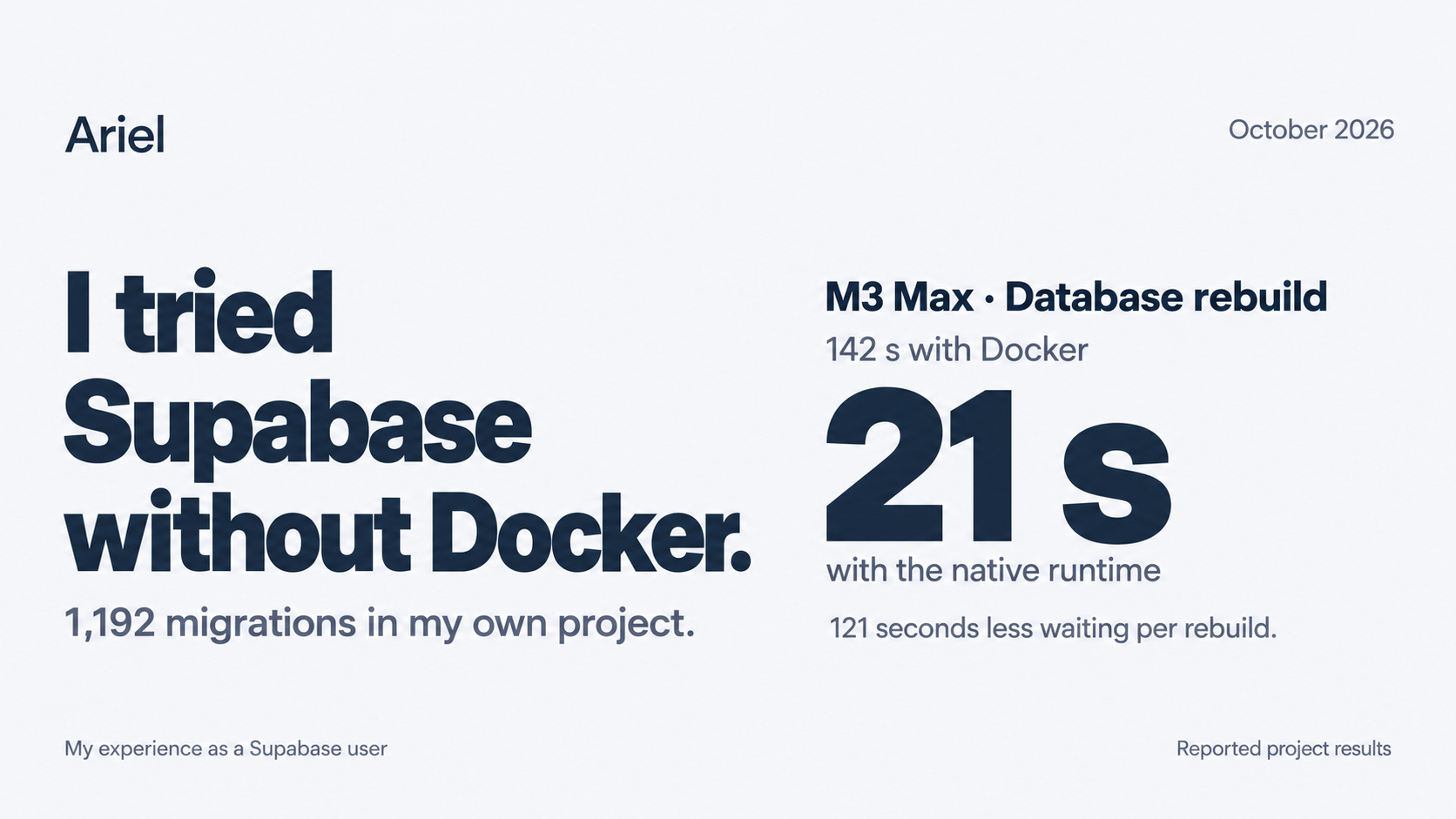
The database I’m working with has 1,192 migrations across 36 schemas. Every fresh local setup has to get through that history before I can do much with it.
On an M3 Max MacBook Pro, the Docker setup took 142 seconds to initialize an empty cluster and apply the migrations. The native run took 21 seconds.
That is the result that made me pay attention. I can live with a two-minute rebuild. I also know what happens during those two minutes: there is enough time to open another tab, start reading something, and come back without quite remembering the next thing I meant to test.
The native runtime got through the same migration history on an Ubuntu cloud VM in 56 seconds, against 248 seconds for the Docker setup. The application was still the existing TypeScript monorepo. No trimmed migration demo, no fresh schema written for the test.
I had a much smaller local stack at the end of this experiment. I also had a list of setup problems, an unexpectedly empty database after a branch switch, and a memory comparison that needed more care than its headline suggested.
What “without Docker” actually means
Supabase’s native runtime launches local services as host processes rather than containers. It is available through the experimental stack commands in CLI 2.119.0 and later. Supabase currently calls it Public Alpha; encountering it through the CLI beta channel doesn’t change that status.
This is local development. The hosted production database is unaffected.
On macOS, running natively removes Docker Desktop’s Linux VM from this setup. On a Linux host running Docker Engine directly, there may be no extra VM to remove. The architectural difference is worth understanding before attributing every improvement to virtualization.
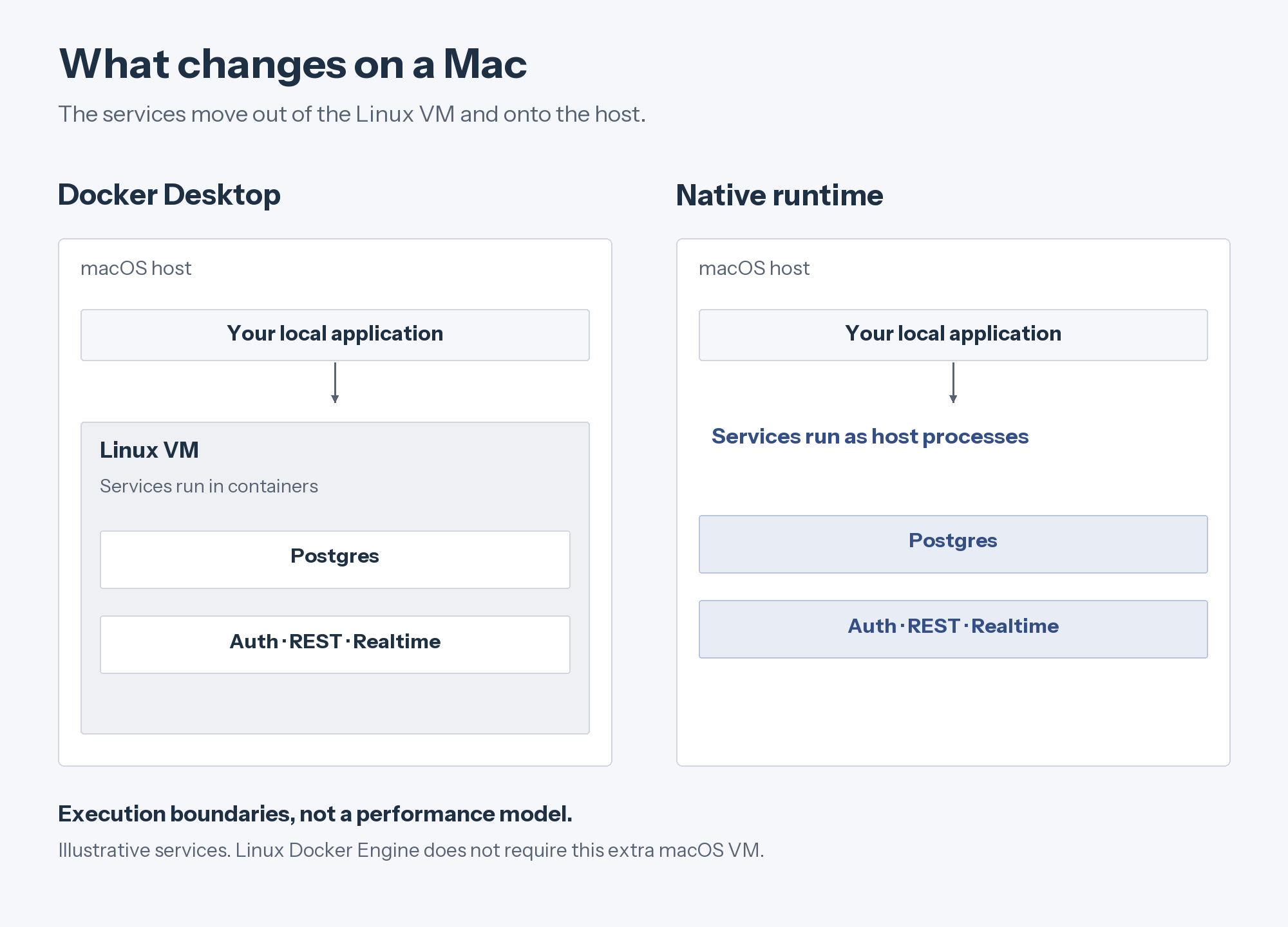
On macOS, the Linux VM is an additional layer. Diagram shows execution boundaries, not a measured breakdown of overhead. Service selection is illustrative.
For a disposable coding sandbox, the immediate benefit is simpler: a container engine is no longer a prerequisite. That was enough reason to try it against my project’s existing database.
The rebuilds were faster on both machines
The recorded times include empty-cluster initialization and migration replay. They do not represent application query latency, request throughput, or a cold download of every service.
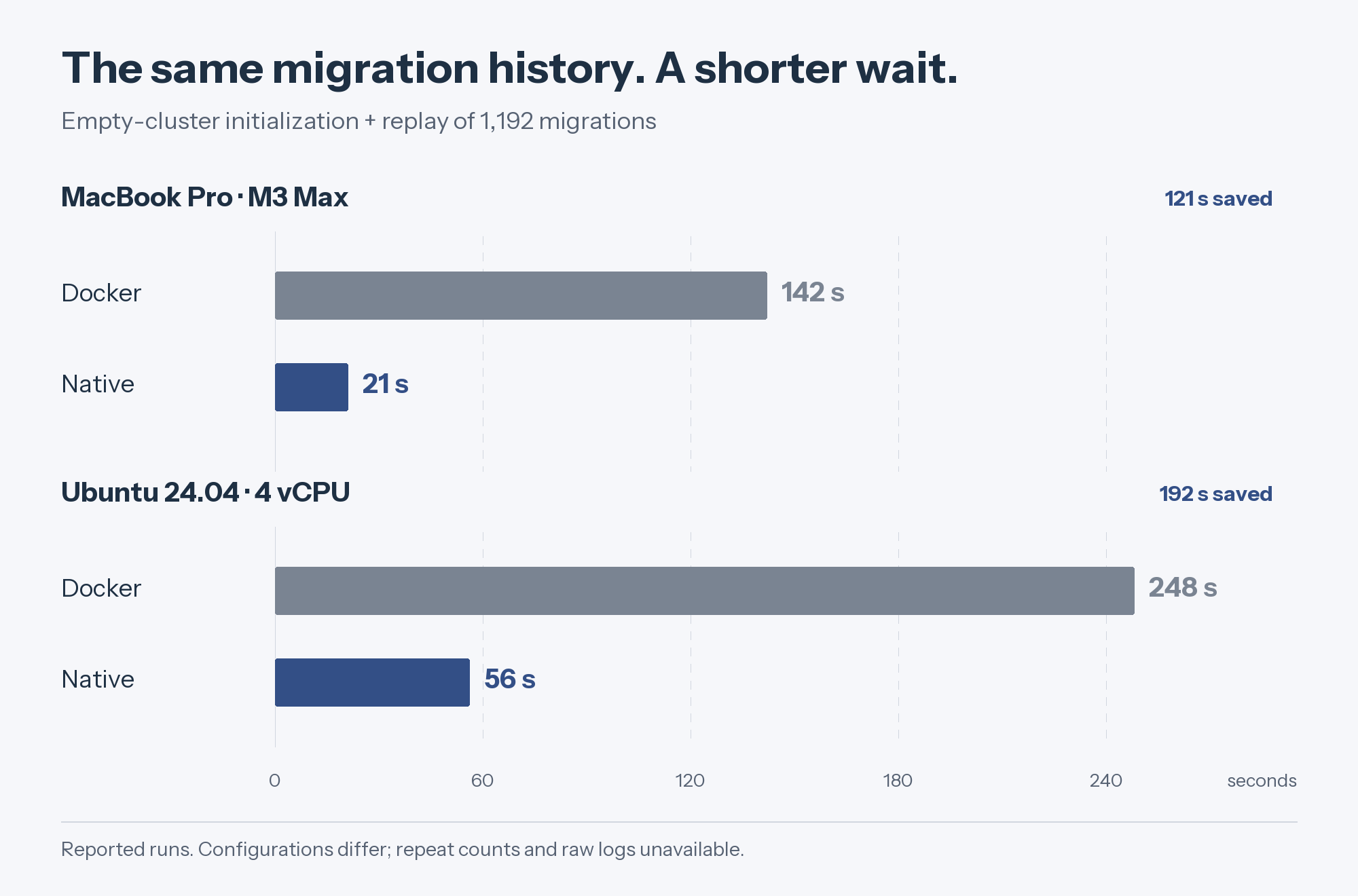
Reported development runs, grouped by machine on one seconds scale. Lower is better. These are configuration comparisons, not an isolated measurement of container overhead.
The Mac run saved 121 seconds per rebuild. The cloud run saved 192 seconds. That makes a practical difference to a workflow that repeatedly creates clean local state.
There are limits to what I can conclude from these figures. The results do not include repeated-run distributions or raw logs, and the recorded setups differed in PostgreSQL version and enabled services. The ratios—6.8× on the Mac and 4.4× on the VM—describe these runs. They are not a forecast for another project.
I also can’t pin the improvement on VirtioFS. Docker’s storage guidance distinguishes host-shared directories from database volumes inside the Linux VM. The path the database writes to matters. So do caching, configuration, and the versions being compared.
There is a missing control I would want in the next test: Docker under the experimental stack supervisor, configured like native. Supabase documents on-demand service startup and idle stops for both experimental runtimes. That means the move from an older Docker setup to native can change more than the execution engine. The runtime guide explains that behavior.
The next comparison should hold the PostgreSQL version, service set, data, and cache conditions constant, then compare the two runtimes. The current results tell me the new setup was useful. They don’t tell me how much credit belongs to each change.
About that 345 MB figure
The idle numbers were approximately 6.4 GB for the broader Docker setup and 345 MB for the reduced native setup.
I would be pleased to recover that much memory during development. I would not publish it as a “95% saving from removing Docker.” Studio, Analytics, and Storage were excluded from the native configuration, and Docker metrics and process RSS don’t use equivalent accounting.
The smaller configuration may be the right one for a particular task. A database-policy change may not need Studio. A file-upload change needs Storage. If the test leaves out a service the feature depends on, its small footprint is beside the point.
The same caution applies to parallel agents. Multiplying 345 MB by four gives roughly 1.38 GB; it doesn’t measure four complete development environments. Application servers, compilers, agents, and services that wake up under load all add to that total.
For several simultaneous local projects, Supabase currently recommends Docker for its isolation. Native processes share host resources. I’d follow that guidance before treating the low idle number as permission to launch stacks indefinitely.
The first failures weren’t migration failures
One cloud setup failed before it reached the SQL:
initdb: cannot be run as rootPostgreSQL refuses to initialize as root. Some disposable environments hand you a root shell; others don’t. Supabase supports SUPABASE_NATIVE_POSTGRES_USER to select a non-root account. The account has to exist first.
A fresh checkout then exposed another dependency: the Auth configuration referenced a gitignored signing-key file that wasn’t there. Moving to native had not made the project self-contained. It had made the missing setup step visible.
I would provision a valid local signing key through the workflow supported by the pinned CLI, rather than paste the same private key into every new environment. Supabase’s signing-key guide is the reference for that part of the setup.
I also hit getaddrinfo ENOTFOUND app.localhost in the Linux environment. A hostname working in a browser on the Mac did not establish that the application’s resolver on Linux could resolve it. Test from the process that makes the request; configure the specific names it needs. RFC 6761 describes the intended treatment of localhost names, but it isn’t a substitute for that check.
These were separate problems with separate fixes. A setup script that suppresses every error and ends with “environment ready” would have made all three harder to diagnose.
The empty database was a different local project
The branch-switching behavior was the easiest one to misread.
The experimental stack identity includes the project root, Git branch, and optional stack name. Switch branches in the same checkout and you can select another local project, with another database. The empty database I saw was not, by itself, evidence that the previous one had been erased.
Before resetting or reseeding anything, list what exists:
supabase stack listThe multiple-project guide explains that identity model. It also covers fixed ports: an explicit port in config.toml remains a request for that exact port. Automatic allocation needs those fixed settings removed.
There was a related application-side failure. The stack had its own endpoint, but the frontend kept trying 127.0.0.1:54321. A URL exported in the shell was overriding the value in the local environment file. Next.js checks process.env first, as its environment-variable documentation explains.
When the endpoint changes, check what the application inherited and restart its dev server. Writing the correct value into a file doesn’t help a process that is using a different one.
How I’d run the next trial
I’d use a disposable checkout, preserve any local data I care about, and stop the existing local stack before changing its workflow. A pinned CLI version matters here: the stack commands are experimental.
Add stack = true to the existing [experimental] table in supabase/config.toml, or create that table if it is absent:
[experimental]
stack = true
Check the platform requirements, then prepare and start a separate named trial:
supabase stack prepare --stack native-trial --runtime native
supabase start --stack native-trial --runtime native --eager
supabase stack status --stack native-trial --output-format json
The preparation step separates downloads from startup. --eager starts enabled services up front and disables idle stops, which is useful when comparing service footprints. A new stack name separates the trial’s data; if another local stack still holds fixed ports, those must be resolved first.
The runtime is saved when a local project is created. Passing another runtime flag does not convert its data. Use a separate project for the trial, following Supabase’s runtime-switching instructions.
I’d keep the application checks close to the test: replay the migrations, seed the database, sign in, exercise RLS with the intended user roles, and run the Storage, Realtime, and Functions paths the application actually uses. For a named trial, point migration and test tools at that trial’s DB_URL: database commands do not all accept --stack and can otherwise use the default local project. The named-project instructions explain how to select the database explicitly.
Finally, I’d record first boot separately. One initial start in the notes timed out at 199 seconds; a retry succeeded in 18 seconds. Without diagnostic logs, I can’t say why. The 18-second retry should not be presented as the cold-start result.
What I’d use it for
For a coding sandbox without Docker, native is now an option I would try early. It removes a prerequisite that can be awkward or unavailable in that environment, and the full migration history got through it.
On a workstation that already runs Docker reliably, I’d make the decision with a matched service configuration. There is value in the isolation we already have, and the memory headline alone doesn’t settle that tradeoff.
I still want the better benchmark. In the meantime, I have a useful development result: the Mac rebuild went from 142 seconds to 21. For something I repeat while working on the same application, two minutes back is plenty of reason to keep going.
Measurement note: these figures describe the development configurations discussed here. Exact CLI builds, raw logs, cache controls, run counts, and variance are not documented. The results support observations about those configurations, not a controlled estimate of runtime overhead. No battery-life, temperature, or multi-agent scaling claims are inferred. Documentation checked October 23, 2026.